Showing posts with label audacity. Show all posts

Tuesday, April 8, 2008

In followup to Clay Burell's question on my previous post: Audacity can be leveraged to record Skype calls. To do so, you'll need to download and run a third piece of free software: Soundflower.


"Let me 'splain..."
Inigo Montoya

Audio from Skype has to be channelled to Audacity in order to be recorded. Soundflower acts as the conduit.

On my Mac, the settings that work for me can be enlarged by clicking the images below:

1] Audacity: The settings for Audio I/O need to channel sound from the Skype call, through Soundflower. Though I'm not sure that I need to, I set the computer to 'playthrough' the audio to my speakers so that I can hear the caller.


2] Skype: I send the audio out of Skype to Soundflower. The Snowball is my microphone (input); and I like to hear my speakers ring if a call is coming through.


3] Soundflower: Setting Soundflower to listen to the Built-in Output, ensures my Microphone and the incoming audio from the Skype call are both received.


If there is an easier way to record Skype calls (with free software), feel free to add directions to the comments below.

Recording Skype Calls with Audacity

In followup to Clay Burell's question on my previous post: Audacity can be leveraged to record Skype calls. To do so, you'll need to download and run a third piece of free software: Soundflower.


"Let me 'splain..."
Inigo Montoya

Audio from Skype has to be channelled to Audacity in order to be recorded. Soundflower acts as the conduit.

On my Mac, the settings that work for me can be enlarged by clicking the images below:

1] Audacity: The settings for Audio I/O need to channel sound from the Skype call, through Soundflower. Though I'm not sure that I need to, I set the computer to 'playthrough' the audio to my speakers so that I can hear the caller.


2] Skype: I send the audio out of Skype to Soundflower. The Snowball is my microphone (input); and I like to hear my speakers ring if a call is coming through.


3] Soundflower: Setting Soundflower to listen to the Built-in Output, ensures my Microphone and the incoming audio from the Skype call are both received.


If there is an easier way to record Skype calls (with free software), feel free to add directions to the comments below.

Monday, April 7, 2008

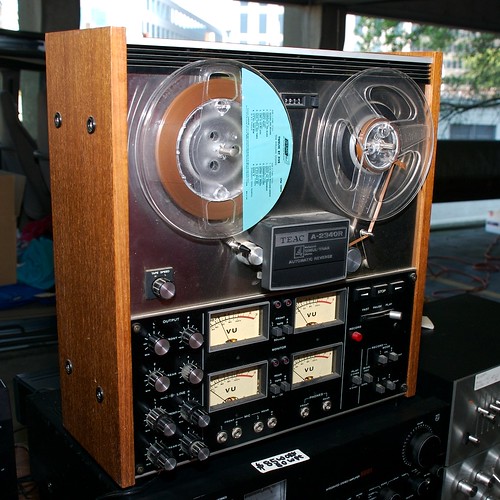
My introduction to audio recording, came when I was in 9 years old and attended school on a 'snow day'. The teachers wanted to keep me occupied, and they turned me loose with a reel-to-reel audio recorder. It seemed like magic that I could make my grade four voice sound like chipmunks or giants by simply playing with the tape speed. Although that event took place for me some 35 years ago, the experience is still vibrant in my mind.

Will your students have similar memories? Today's tools are far more powerful, inexpensive and easy to use, yet most 9 year olds rarely get the chance to do creative work with audio. This post is intended to provide support to those who may be willing to take a creative leap with their students.

There are plenty of professional style audio tools you could use, and while I love to use Garageband, I realize that most educators need a simple, free solution. You may be interested to know that free software is available that you and your students can use to create MP3 audio files! Audacity is an easy-to-use tool that is easily mastered... if you can get past the installation!

Here is how get the software:


If this software is not available on your school network, I recommend sending a polite request to your I-T department. It's difficult to argue with free and easy, especially when such tools open the door for all sorts of creative output by students. Limited options include:

1] create book reviews on audio that can be stored in the library;
2] narrate primary picture books that can be borrowed along with the book by primary students;
3] record old-time radio dramas complete with authentic sound effects;
4] in lieu of public speaking, create audio editorials;
5] broadcast 'rich' school announcements to publicize special events;
6] produce your own original music;
7] challenge students to be foley artists for a given piece of silent video;
8] dramatize poetry or other creative writing...

Beyond sharing audio to live local audiences, MP3 files are easliy shared, and can be published online with little effort. In order to get there, you'll have to take the leap and grab a microphone! If you get any cool projects done, feel free to share your results; I'll be happy to give you or your students airtime on the Teacher 2.0 podcast.

Go for it! Your students will love it, and you'll be meeting multiple curriculum expectations to boot!

Photo credit: Andy Ihnatko

Audacity... Free and Simple Audio Recording

My introduction to audio recording, came when I was in 9 years old and attended school on a 'snow day'. The teachers wanted to keep me occupied, and they turned me loose with a reel-to-reel audio recorder. It seemed like magic that I could make my grade four voice sound like chipmunks or giants by simply playing with the tape speed. Although that event took place for me some 35 years ago, the experience is still vibrant in my mind.

Will your students have similar memories? Today's tools are far more powerful, inexpensive and easy to use, yet most 9 year olds rarely get the chance to do creative work with audio. This post is intended to provide support to those who may be willing to take a creative leap with their students.

There are plenty of professional style audio tools you could use, and while I love to use Garageband, I realize that most educators need a simple, free solution. You may be interested to know that free software is available that you and your students can use to create MP3 audio files! Audacity is an easy-to-use tool that is easily mastered... if you can get past the installation!

Here is how get the software:


If this software is not available on your school network, I recommend sending a polite request to your I-T department. It's difficult to argue with free and easy, especially when such tools open the door for all sorts of creative output by students. Limited options include:

1] create book reviews on audio that can be stored in the library;
2] narrate primary picture books that can be borrowed along with the book by primary students;
3] record old-time radio dramas complete with authentic sound effects;
4] in lieu of public speaking, create audio editorials;
5] broadcast 'rich' school announcements to publicize special events;
6] produce your own original music;
7] challenge students to be foley artists for a given piece of silent video;
8] dramatize poetry or other creative writing...

Beyond sharing audio to live local audiences, MP3 files are easliy shared, and can be published online with little effort. In order to get there, you'll have to take the leap and grab a microphone! If you get any cool projects done, feel free to share your results; I'll be happy to give you or your students airtime on the Teacher 2.0 podcast.

Go for it! Your students will love it, and you'll be meeting multiple curriculum expectations to boot!

Photo credit: Andy Ihnatko